Rackside
Running a session
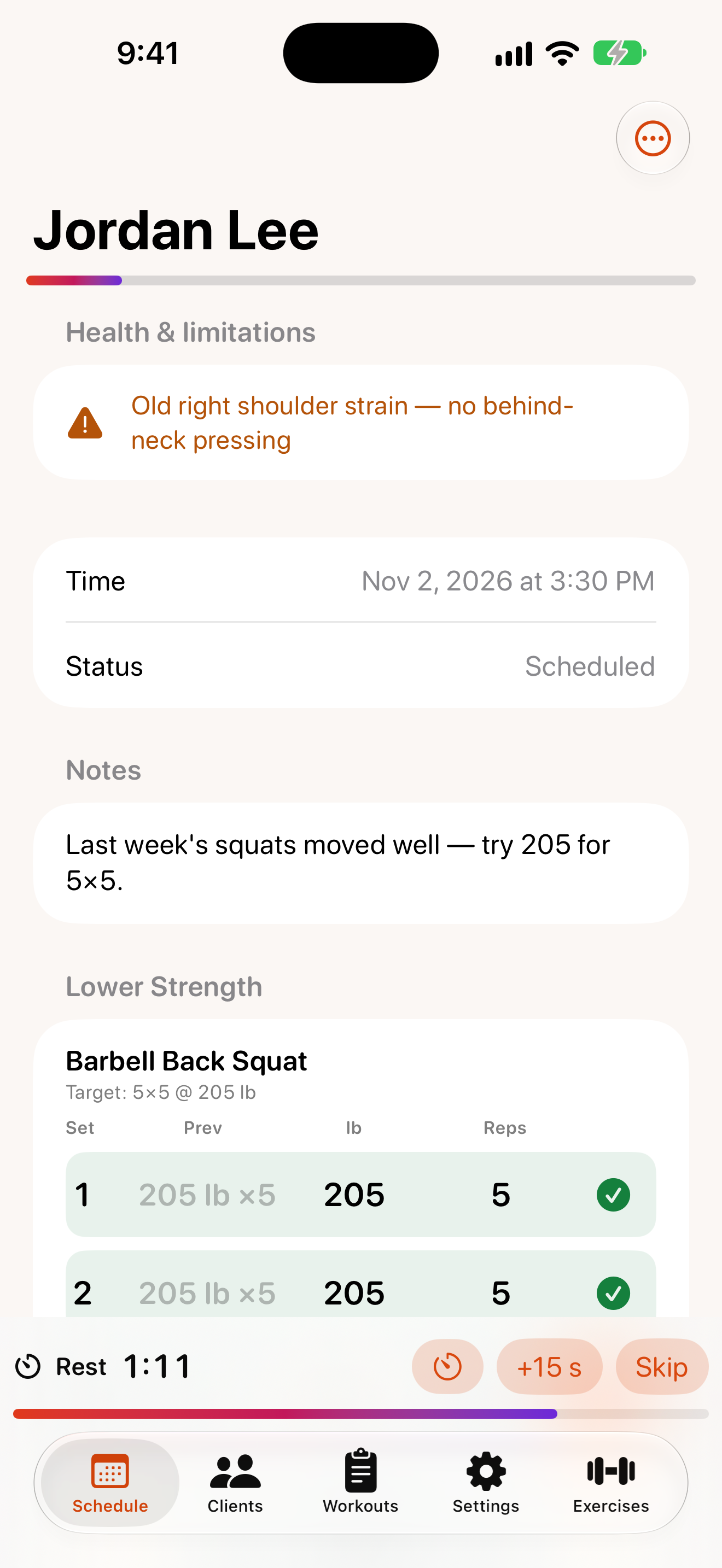
Open a session from the Schedule tab or from a client’s page.
Before you start
- Health & limitations shows the client’s injuries and a warning if medical clearance is recommended.
- Notes: add or edit
Session notes, then tapSave notes. - The bar under the client’s name shows how many planned sets you’ve logged.
Log sets
Each exercise has a set table:
- Prev shows what the client did last time. Tap it to copy those numbers into the current set.
- Tap a number (weight, reps…) to change it with the stepper that appears below the table.
- Tap the ✓ at the end of the row to log the set.
Logged sets turn green. To remove one, tap its ✓ and confirm Delete set.
Rest timer
Logging a set starts a rest countdown at the bottom of the screen (the length is set in Settings). While it runs you can:
- tap +15 s to add time,
- tap
Skipto end it, - tap
Change(the timer icon) to pick a different length.
When no timer is running, tap Rest to start one manually. Rackside alerts you when time is up, even if your phone is locked. The timer also appears on your Apple Watch.
Timed sets
For timed exercises like a plank, tap Start 45 s countdown (the time matches the target). When it finishes, the duration is filled in for you — just log the set.
Finish the session
At the bottom of the session:
Mark Completedwhen you’re done,Cancelledif it didn’t happen,No-showif the client didn’t turn up.
Completed sessions feed the client’s progress reports.
Text a reminder
Tap the message button (Text reminder) at the top to open a pre-written text to the client in Messages. You review it and tap Send yourself.